What is HyperIntelligence in Strategy?
HyperIntelligence in Strategy is powered by advanced data models. It finds keywords in popular web apps and native email clients to display cards with contextual insights pertinent to the current workflow. HyperIntelligence follows users throughout the day, delivering intelligence nuggets wherever they work, rather than having to hop between apps.
What is a HyperCard?
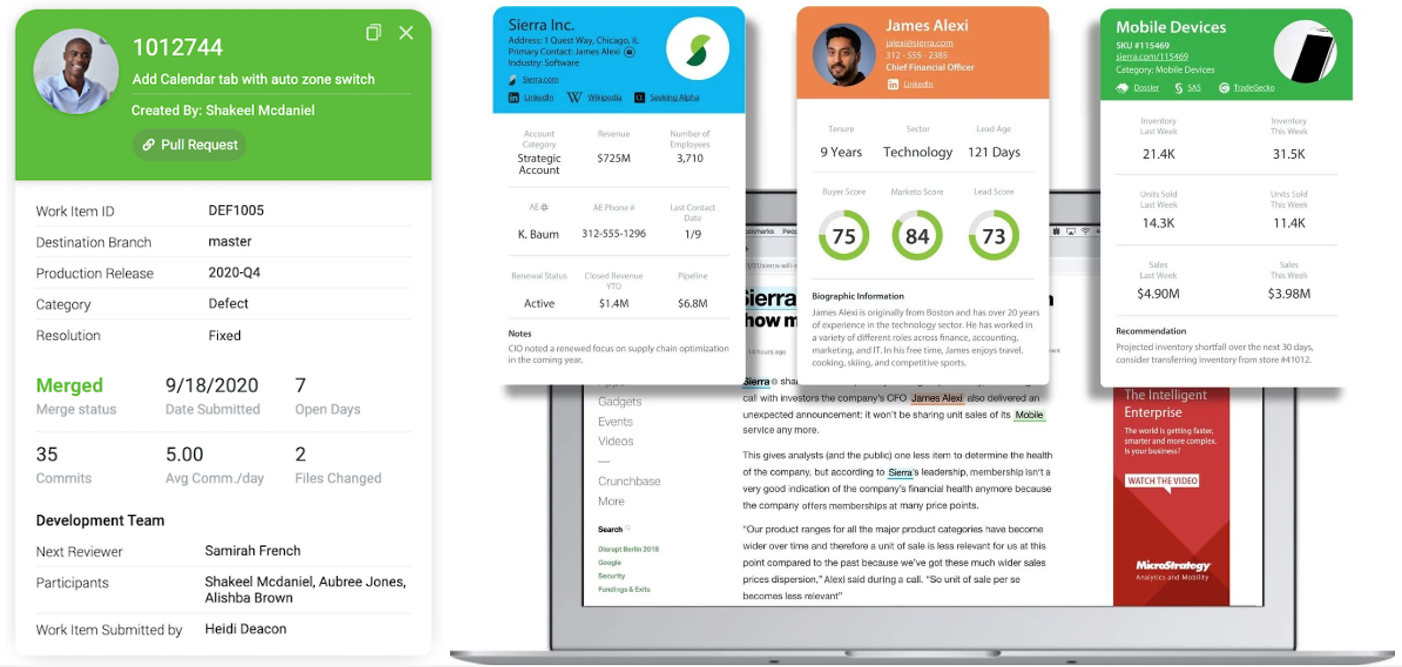
HyperCard is a dynamic, information-rich pop-up card that appears quickly when users hover over a customer name, product ID, or region, and instantly sees key details and performance trends.
Source: Strategy
Consider it a quick overview of key insights, contextual information, performance metrics, and practical suggestions without ever leaving your chat window, browser, email, or phone.
Data visibility is essential, but so are data meaning and actionability. Users can quickly grasp what’s going on, why it matters, and what to do next with HyperCard.
How to Create HyperCards?
Anyone from C-levels to a data analyst can develop HyperCards directly in Strategy Workstation using a simple drag-and-drop interface.
Step 1: Define the keyword trigger and the KPIs to be visualized in the HyperCard.
Step 2: Structure the data model so each keyword appears only once, with all related KPIs placed in the same row as columns. Any images that need to be included in the HyperCard must be provided in HTML format.
Step 3: Load the data into the Strategy Workstation environment and prepare it as follows:
Images: These are loaded as text by default and must be converted into HTML tags.
Multiple attributes: To display several attributes under the keyword (as shown below), select the required fields and use the Multi-form Attribute feature

Step 4: Develop the card by selecting the appropriate widgets, creating new derived metrics, formatting them to match your organization’s branding, and optionally embedding a chatbot to enable AI capabilities.
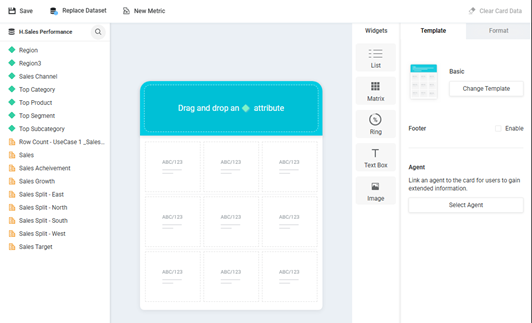
Step 5: Voila, your Hypercard is ready. Deploy and start using it on the go.
The Power of Integration: Works Wherever You Work
What sets HyperCard apart is its ability to extend beyond Strategy’s BI environment. It integrates effortlessly with the everyday tools business users already rely on:
• Web Browsers: Microsoft Edge, Google Chrome
• Email Clients: Outlook, Gmail
• CRM Platforms: Salesforce
• Collaboration Tools: Microsoft Teams, Slack
• And most importantly, it is available right on your personal mobile device
This broad compatibility means your data travels with you, appearing in context as you work, no app switching, no delays, no friction.
Key Features That Define HyperCard
1. Insights in Zero Clicks
HyperCard uses the location and task you’re working on to find the relevant data. For instance, hovering over a name in an email may instantly display that person’s latest engagement score, client comments, or sales performance.
2. Low-Effort Implementation
For you to create a HyperCard, you don’t have to be a data engineer. In only a few minutes, users may specify data points, set rules, and drag and drop components using Strategy’s user-friendly Workstation interface.
3. Instant Data Access
HyperCard guarantees that each number and insight presented is up-to-date, accurate, and reliable because it is directly connected to your company’s real-time data sources.
4. Ease of Use
HyperCard supports business users with its intuitive, no-code setup. It helps to leverage contextual analytics without training or technical support.
Best Practices for Building Effective HyperCards
You can keep these best practices in mind to maximize impact and reliability:
• Better Data Quality:
To improve impact, you should use well-tested datasets, especially when combining multiple data sources.
• Predefine Metrics:
Since HyperCards display aggregated values (not trend analyses), ensure metrics like Quarter-to-Date Sales or Customer Retention (Last Year) are prebuilt.
• Consistent Design:
Match your HyperCard’s UI/UX to your organization’s BI branding or the interface it integrates with, for a better visual experience.
Benefits of HyperCards
HyperCard transforms the daily workflow of professionals by embedding intelligence into the flow of work. Here are the benefits of hypercards and how they make a difference:
• Reduces the time spent searching or switching tools for data.
• Helps to find key insights wherever you need, and it simplifies evaluations.
• Encourages a self-service, data-driven culture across various departments.
Real-World Use Cases: Where HyperCard Delivers Value
1. Sales Operations
You can get instant access to customer details, engagement analytics, and lead status in your inbox or CRM, and with zero clicks, you can track sales success across agents, locations, or shops.
2. Customer Support
With HyperCards, you get instant access to customer satisfaction ratings, ticket histories, and resolution metrics. It enables support teams to react more quickly and personally.
3. Human Resources
HR departments can better manage and engage staff by easily monitoring employee performance, training progress, and goals.
4. Supply Chain Management
You can track real-time stock alerts, lead times, and inventory levels with ease using HyperCards.It improves operational responsiveness and efficiency by proactively resolving problems before they escalate.
From Data to Decision, Instantly
As a component of the HyperIntelligence suite, Strategy’s HyperCard ushers in a zero-click analytics era. It closes the gap between information and action by integrating contextual, real-time insights into routine activities. HyperCard helps you see what matters, comprehend why it matters, and take confident action in a world where data is abundant.
Connect with us to know more: https://beinex.com/contact-us/






 Back
Back

